I work as the senior developer on a healthcare platform — appointment booking, video consultations, prescription management, payment processing, calendar sync with Google, SMS and email reminders. The product is live in the market with a growing base of patients and clinicians relying on it every day.
As part of my workflow, I use AI assistants to accelerate development — generating code, debugging issues, building new features. And through that experience, I’ve come to a conclusion that might sound counterintuitive:
Design patterns matter more with AI-generated code, not less.
Not because AI writes bad code. It doesn’t — most of the time, the code compiles, passes tests, and does what you asked. The problem is subtler than that. AI generates code that works but doesn’t *belong*. It solves the immediate problem without understanding the architectural decisions that shaped the codebase before it arrived. And if you don’t catch that, your codebase slowly loses its structure — one AI-generated function at a time.
This isn’t a theoretical concern. Everything in this post comes from real incidents, real bugs, and real architectural decisions on a production system that handles patient health data. The stakes are real: a missed appointment means a patient doesn’t get care. A stale status means a patient can’t book for months. A duplicated payment means someone gets charged twice. The architecture behind the code isn’t optional — it’s what keeps those things from happening.
Why AI Needs You to Understand the Design
AI is exceptionally good at generating code that solves the problem you described. What it can’t do is understand the context that code lives in. It doesn’t know why your team chose a particular structure. It doesn’t remember what it generated yesterday. It doesn’t see the architectural intent behind the patterns already in place.
When you say “build this feature,” AI picks whatever approach was most common in its training data. The result compiles. Tests pass. It ships. But the approach it chose might conflict with the patterns your codebase already follows, and you won’t know unless you understand those patterns yourself.
This is the trap: AI makes it easy to stop thinking about design. The code works, so why question the structure? Because six months from now, three modules solving similar problems will use three completely different approaches — and nobody will be able to explain why. Because nobody chose. The AI chose, and it doesn’t remember why.
Understanding design patterns isn’t about writing better code — AI can write clean code. It’s about recognising whether the code AI gives you fits the architecture you’re building. That recognition is the difference between a codebase that grows well and one that slowly falls apart while every individual piece looks fine.
The Patterns That Actually Matter
There are dozens of documented design patterns. In practice, a production backend like ours relies heavily on a few core patterns. These aren’t chosen for elegance — they’re chosen because without them, the system breaks in ways that are expensive to find and painful to fix.
Here are the four that carry the most weight in our healthcare backend, and what I’ve learned about how AI interacts with each one.
1. MVC — Model, View, Controller
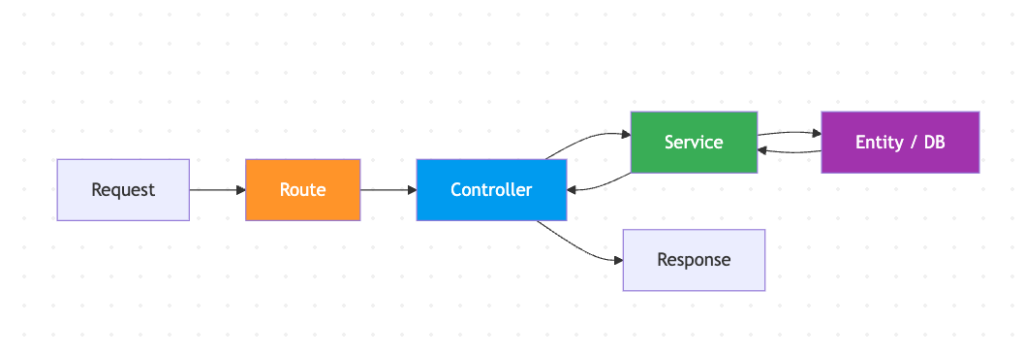
The foundation of the entire application. Every request flows through a predictable path: the route defines the URL, the controller handles the HTTP request and response, the service contains the business logic, and the entity represents the data.
This separation sounds basic, but it’s the single most important structural decision in the codebase. When it’s respected, you always know where to look: need to change how a response is formatted? Controller. Need to change business logic? Service. Need to change the data shape? Entity. There’s no guessing.
In our codebase, the controllers are clean and disciplined. They receive a request, call a service method, and return the result. No business logic leaks into controllers. That discipline has held up well over the life of the product.
Where AI gets it right: When I ask AI to create a new endpoint, it follows the MVC structure it sees in the existing code — creates a route, writes a thin controller, delegates to a service. The pattern is visible enough that AI picks it up reliably.
Where human judgment matters: MVC tells you where code goes, but not when to split. Our calendar service — the heart of the application — has grown large because every calendar-related feature went into the same service. The pattern was followed (“business logic goes in the service”) but the principle behind it (“keep things focused and manageable”) wasn’t enforced as the codebase grew. AI can’t tell you when a service has gotten too big and needs to be divided into focused sub-services. That’s an architectural judgment call that requires understanding both the pattern and the product.
The takeaway: MVC is the pattern AI handles best because it’s structural and visible. But the deeper principle — separation of concerns — requires human enforcement as the codebase scales. A service that does too many things is still technically MVC. It’s just bad MVC.
2. Middleware — Chain of Responsibility
Every request to our API passes through a chain of checks before reaching the controller: authentication (is this user who they say they are?), subscription verification (do they have an active membership?), role-based access control (are they allowed to access this resource?), and input validation (is the data they sent valid?).
This chain is declared at the route level:
[authMiddleware, subscriptionMiddleware, rbacAdmin, validationMiddleware(CreateEventDto)]

Reading that single line, you immediately know: this endpoint requires authentication, an active subscription, admin role, and validates the request body against a specific schema. No need to open the controller or the service to understand the security model. It’s all right there.
This pattern is one of the strongest parts of our architecture. Authentication middleware is consistently applied across all protected routes. Validation middleware uses DTO classes — dedicated objects that define exactly what shape the incoming data must have — so invalid requests are rejected before they reach business logic. The ordering is reliable: auth first, then role check, then validation.
Where AI gets it right: When AI creates a new endpoint, it looks at neighbouring route definitions and applies the same middleware chain. If the three nearest endpoints all have `[authMiddleware, validationMiddleware(…)]`, the AI will include them. The pattern is so declarative that AI follows it almost perfectly.
Where human judgment matters: The chain only works when it’s applied everywhere. In our codebase, webhook endpoints don’t follow the same middleware pattern — their signature verification happens inside the service logic instead of the route definition. It works, but it’s inconsistent. And when AI sees an endpoint without middleware, it might generate a new endpoint without middleware too. The AI copies what it sees — including the exceptions.
The takeaway: Middleware is arguably the cleanest pattern in a well-structured backend because it makes security and validation auditable at a glance. But consistency is everything. One unprotected endpoint becomes the template for the next AI-generated endpoint. The value of the pattern isn’t in having it — it’s in having it everywhere.
3. Adapter — Wrapping External Services
A healthcare platform doesn’t operate in isolation. Ours integrates with seven external services: Cronofy for Google Calendar sync, Stripe for payments, SendGrid for emails, AWS Cognito for authentication, HubSpot for CRM, Daily.co for video consultations, and AWS SNS for push notifications. Each has its own SDK, its own authentication mechanism, its own error format, its own rate limits.
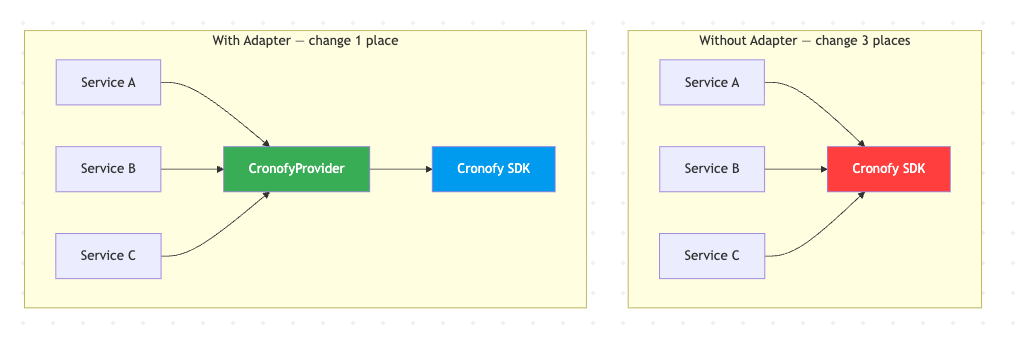
The adapter pattern wraps each external service behind a consistent internal interface. Instead of calling the Cronofy SDK directly from business logic, you call a provider class that exposes methods like `createEvent()`, `deleteEvent()`, `refreshToken()`. If Cronofy changes their API tomorrow, you update one file — not every service that touches calendars.
This pattern proved its value recently. A doctor reported that appointments weren’t appearing on their Google Calendar. The calendar sync was failing silently — no retry, no error surfaced to anyone. We needed to add retry logic to every Cronofy call. The parts of the codebase that went through the adapter were easy — add retry once, every consumer benefits. The parts that bypassed the adapter and called the SDK directly had to be found and wrapped individually.
Where AI gets it right: AI understands the adapter concept well. If you tell it “create a provider for this external API,” it will generate a clean wrapper class with methods that translate between your internal types and the API’s types. The structural pattern is straightforward.
Where human judgment matters: AI doesn’t enforce exclusivity. If your codebase has both an adapter and direct SDK calls for the same service, AI will use whichever it sees more of in the current file. Over time, the adapter becomes less relevant as direct calls accumulate. The architectural decision isn’t “create an adapter” — it’s “the adapter is the *only* way to access this service, no exceptions.” AI doesn’t enforce that rule. You do.
The takeaway: An adapter that isn’t the sole gateway to its external service is just extra code. The value is in the constraint — “all Cronofy calls go through CronofyProvider.” When that constraint is enforced, every improvement (retry logic, circuit breakers, logging, token refresh) lands in one place and benefits every consumer. When it’s not enforced, you have two paths to maintain and bugs that only appear on one of them.
4. Observer — Reacting to External Events
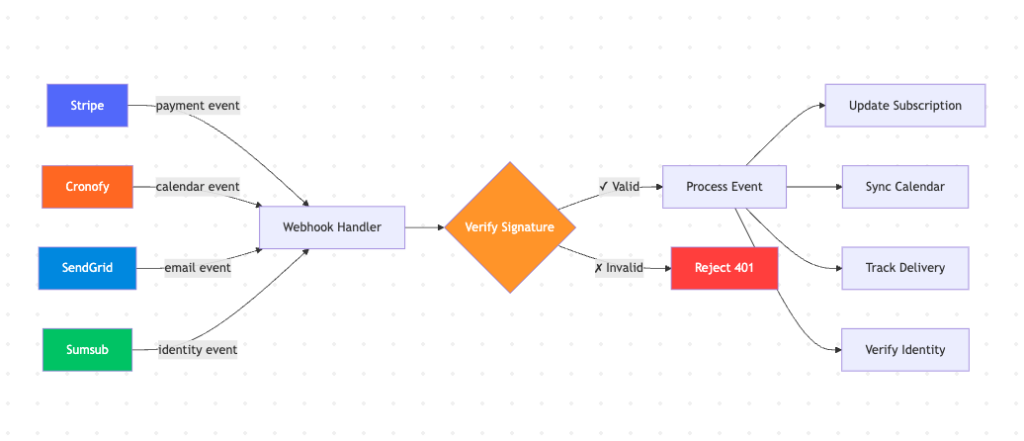
In a connected healthcare system, things happen outside our control that we need to react to. When a patient pays, Stripe sends a webhook. When a doctor moves an appointment in Google Calendar, Cronofy notifies us. When an email bounces, SendGrid tells us. When an identity verification completes, Sumsub pushes an event.
The observer pattern defines how we receive, validate, and process these external events. It’s one of the most critical patterns in the system because it handles money (payments), time (calendar sync), communication (email delivery), and identity (verification) — all things that directly affect patient care.
Our webhook handlers do a solid job on the security side. Stripe webhooks verify cryptographic signatures. Cronofy uses timing-safe HMAC comparison. SendGrid validates with ECDSA signatures. Every external event is authenticated before processing.
Where AI gets it right: AI generates clean webhook handlers — parse the event, validate it, route to the appropriate handler, return 200. The basic structure is always correct.
Where human judgment matters: AI generates webhook handlers that handle the happy path. What it rarely considers is: what happens when the same event arrives twice? Webhooks can be retried by the sender. If Stripe sends a “payment completed” event and our handler is slow to respond, Stripe sends it again. Without idempotency checks — a mechanism to recognise “I’ve already processed this event” — the handler might create a duplicate subscription or trigger a duplicate notification.
We discovered a variant of this in our subscription status sync. The webhook correctly updated the subscription record in one table but failed to mirror the change to another table that the frontend reads. Patients who cancelled their subscription still showed as “active” in the app. The observer received the signal, but the internal reaction was incomplete — and because there was no mechanism to detect or correct the drift, it persisted indefinitely until someone manually noticed.
The takeaway: The observer pattern isn’t just about receiving events — it’s about receiving them safely. AI gives you the first 80%: receive the event, process it, return success. The remaining 20% — idempotency, deduplication, completeness of the internal reaction, handling retries gracefully — requires understanding the pattern deeply enough to know what “done” actually looks like in a distributed system.
What Happens When a Pattern Is Missing
Sometimes the most revealing finding isn’t which patterns are present — it’s which ones should be there and aren’t.
Our application has appointments that move through a lifecycle: scheduled, completed, cancelled, rescheduled, noshow. Subscriptions follow a similar path: incomplete, active, paused, cancelled. These state transitions govern what patients can and can’t do in the app — whether they can book, whether they can join a call, whether they see a paywall.
There’s no formal State pattern managing these transitions. Status changes happen through string comparisons scattered across services: `if (event.status === ‘cancelled’) …`. There’s no single source of truth defining which transitions are valid. No enforcement that prevents impossible states. No automatic transitions for states that should resolve on their own.
This led to a real problem. A patient had an appointment that ended, but the clinician never marked it as completed. The backend still showed it as “scheduled.” The mobile app saw a past-dated scheduled appointment and computed a client-side “expired” status — displaying a message that said “please wait while your clinician updates the appointment status.” And it rendered zero buttons — no option to book a new appointment, no option to contact support, no way forward. The patient was stuck on that dead-end screen until support manually intervened.
A State pattern would have prevented this entirely. The system would know that “scheduled + end time passed + no clinician action” should automatically transition to a resolved state after a grace period. Or at minimum, the “expired” state would define its own allowed actions instead of being a dead end.
When I use AI to work on the appointment flow, it follows the existing approach — adds another string comparison, another if/else branch. It doesn’t suggest “this should be a state machine” because the codebase doesn’t use one. AI extends patterns that exist. It doesn’t introduce patterns that are missing. That judgment — recognising the absence of a pattern and deciding it’s needed — is an architectural skill that AI doesn’t have.
The Core Lesson
After working with AI extensively on a production codebase, here’s what I’ve come to understand:
AI amplifies whatever patterns exist in your code — good or bad. If your middleware chain is consistently applied, AI will apply it on new endpoints too. If your services bypass the repository layer, AI will bypass it too. If your adapter is the sole gateway to an external service, AI will use it. If it’s not, AI won’t.
The patterns don’t protect your codebase by existing. They protect it by being enforced. An adapter that’s bypassed is just extra code. A middleware chain with exceptions is a security audit waiting to happen. A repository layer that’s mostly ignored creates a false sense of architecture.
Understanding the design is not optional when AI writes the code. AI makes it easy to stop thinking about structure — the code works, tests pass, the feature ships. But “it works” and “it belongs” are different questions. A function that works perfectly can still damage the architecture if it’s in the wrong place, follows the wrong pattern, or introduces an inconsistency that the next AI-generated function will copy.
When AI generates most of your code, your primary job shifts. It’s no longer about writing the patterns — AI can write a textbook implementation of any pattern you name. It’s about choosing which patterns the codebase needs, enforcing them consistently, and catching the moment when AI-generated code drifts away from them. That’s the architectural judgment that keeps a codebase maintainable as it grows — and it’s the one thing AI can’t do for you.
Design patterns mattered before AI. They matter more now. Not because the patterns changed, but because the volume and speed of code generation changed. A human developer writing one function a day had time to think about where it belongs. AI writing ten functions an hour doesn’t think about that at all. Someone has to. That someone is you.
—
Comments are closed